

Payloads sent to your system whenever important changes about your orders happen.
Overview
You may subscribe to all of the events that can occur in a Locally shopping cart. These events include, but are not limited to:
- When a cart has been ordered (sent to a local shop for fulfillment).
- When a store has confirmed that an item in the cart is in-stock and ready for pickup or delivery.
- When a store has issued a refund or partial refund of an item.
- When a store or shopper has sent any communications regarding the order.
- Several others, including special webhooks related to Ship-to-Store or Same-day-delivery purchases.
Parties that are eligible to receive webhook payloads:
- Point-of-sale system providers who wish to integrate Locally with their own interfaces.
- Headless API users who want to track the activity on any submitted Locally carts and transactions.
Example Payload
Here is an example of a payload sent to a webhook address indicating that an item from a Locally cart has been confirmed as in-stock by the related retailer:
{
  "store_id":245728,
  "upc":"601842495575",
  "order_id":"QE3QL6",
  "status":"confirmed",
  "order_url":"https://www.locally.com/api/v2/cart/QE3QL6"
}
Configuring & Authenticating Webhooks
Using your Locally Station login, navigate to the webhook configuration page .
Click "Add a New Webhook" button. Or, if you already have a webhook configured, click it. You will see a screen like this:
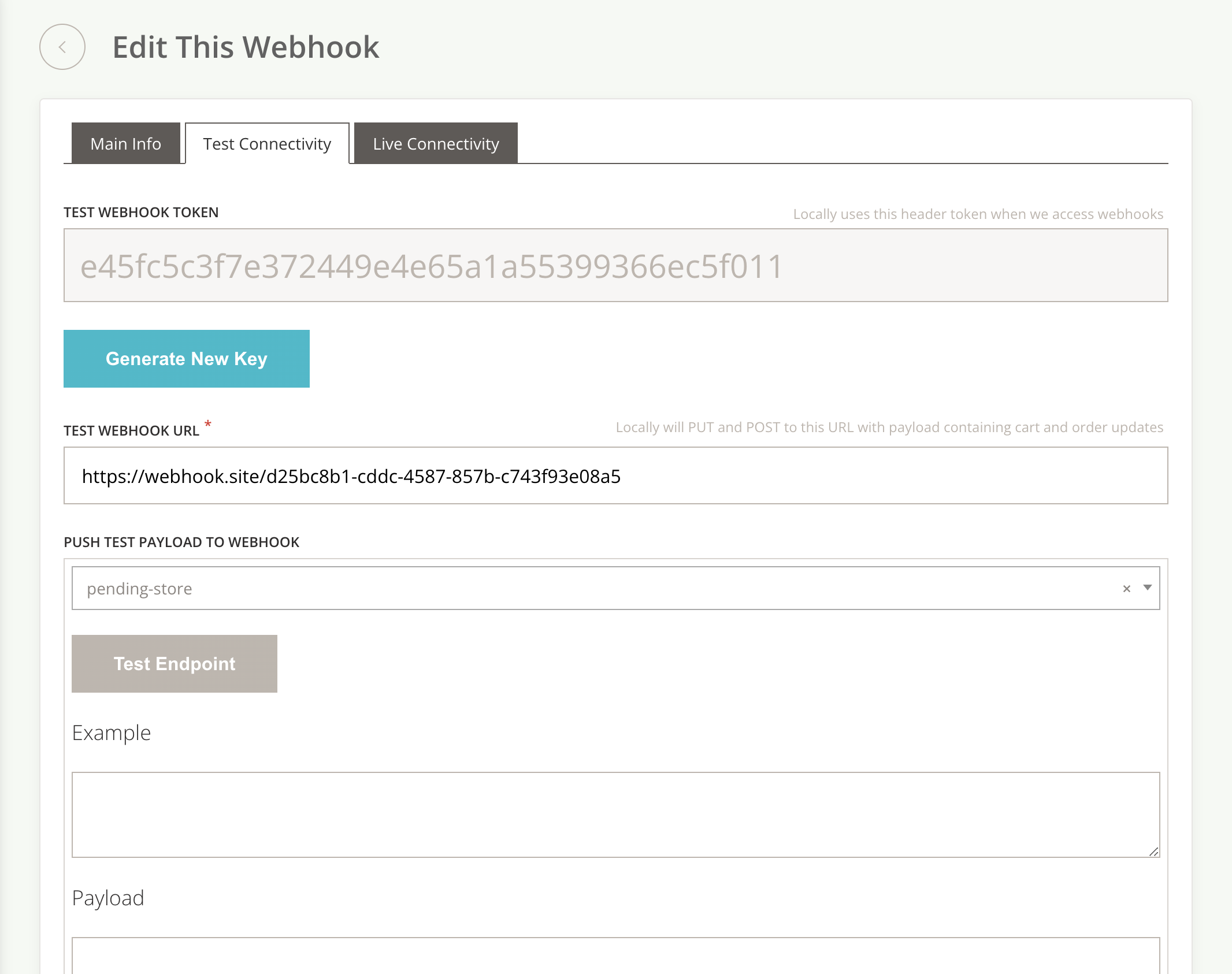
- There are 3 tabs:
- Click "Generate a New Key". This will create a string that will be sent as the
locally-webhook_tokenheader in every request that Locally sends to your chosen webhook URL. Your webhook handler endpoint should authenticate against this string and periodically regenerate it, for security purposes. - Test webhook payloads by selecting a payload sample under the "Push Test Payload to Webhook" section of either the "Live Connectivity" or "Test Connectivity" tabs.
- Click "Test Endpoint". You will see the payload and response from your server appear in the fields below.
DoorDash Marketplace Orders
For DoorDash marketplace orders, webhook behavior differs from native fulfillment:
- Integrators do receive order and item webhooks (e.g., ordered, confirmed, refund) for DoorDash marketplace orders.
- Delivery status webhooks (driver assigned, picked up, delivered, canceled) are not sent for DoorDash marketplace orders, since DoorDash manages its own fulfillment flow.
- Native same-day delivery orders do receive delivery status webhooks.
Important Considerations
- We will attempt to re-send webhooks 3 more times to any endpoint that doesn't respond. Retries will happen within 1 minute of the initial attempt. If we are unable to deliver to webhook payload due to an outage or misconfiguration on your end, we will not try again.
- Webhooks related to shopper and retailer activity for a cart are sent at the cart item level. This means that if you submit a single cart containing 3 distinct upcs, you will always receive individual webhooks for each of these 3 upcs, not one webhook per cart.
- Delivery status webhooks (driver assigned, picked up, delivered, canceled) are only sent for native same-day delivery orders. DoorDash marketplace orders receive order and item webhooks but not delivery status webhooks, since DoorDash manages its own fulfillment flow.