

Tracking Options
What additional tracking is available?
- Accessing a User's Location for the Store Locator
- Accessing a User's Location for the Product Locator
- Track Your Buy It Locally Shoppers
- Accessing Data Programmatically in the Product Locator
Accessing a User's Location for the Store Locator
In some cases, brands would like to know the location of a user so they can push it throughout the rest of their site. Locally's Store Locator emits event information that can be utilized for this purpose.
- Add an event listener to your site that listens for LOCALLY_region_update event
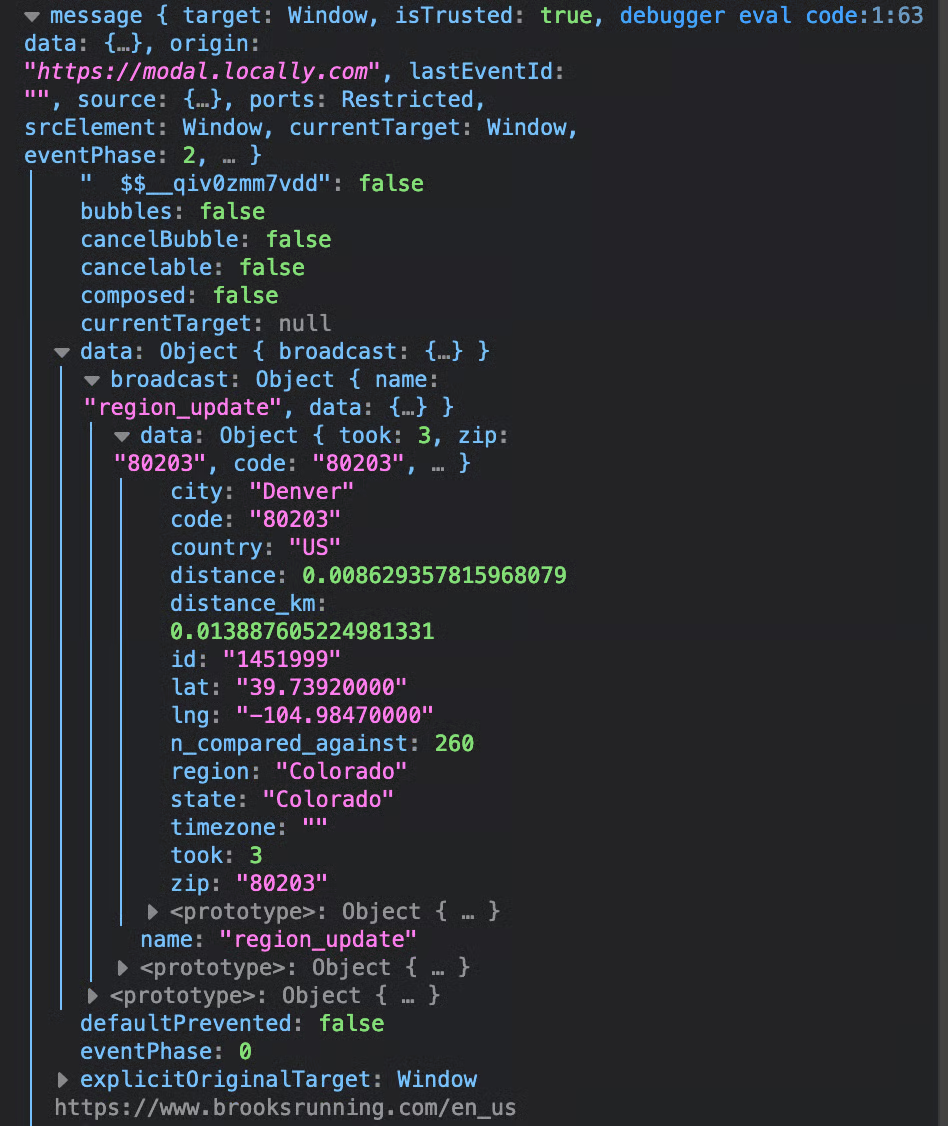
- In the event, you should see a payload like this
- You can use take the emitted event information and use as needed
Accessing a User's Location for the Product Locator
To provide the most accurate nearby results to shoppers, when a shopper loads their first product page on which you've installed the Locally Product Locator, the shopper will be asked to allow or deny the sharing of their location via their browser. If approved, Locally will load this location in the Product Locator and that location will persist across their shopping session. If denied, Locally defaults to using IP-address based geo-location. If desired, your website can also access this result by using the browser location API.
Use this code snippet to check if the user has shared their location:
localStorage.getItem('browser_location_shared');If the user has shared their location, call the browser location api to fetch the coordinates. Here is a sample navigator function:
navigator.geolocation.getCurrentPosition(function (position) {

      // do whatever you'd like with position.coords

    }, function (error) {
      //This is the handler if user does not allow location or already denied a location
    },{
    enableHighAccuracy: true
});
Track Your Buy It Locally Shoppers
If your website is already maintaining and tracking customer sessions, add the following parameter to your Product Locator embed code:
customer_id: 'abc123' // where this is your own internal ID or token for the customer
When a customer creates a Buy It Locally cart, your own ID will be saved and will become accessible via the carts endpoint in the Locally API.
Accessing Data Programmatically in the Product Locator
Locally's Product Locator can broadcast "events" containing information about it's current status, such as location and nearby dealer status, to the HTML page in which it is embedded. This event is called LOCALLY_data_update. In order to "listen" for this event, add an event listener to the page. For example:
window.addEventListener("LOCALLY_data_update", function(event) {
    // event.detail will contain an object will all location-related details
    // act upon event.detail here ...
}, false);
The lcly_event_data output contains the following:
{
    id : 0,
    latitude: 53.546251
    location_name: "Edmonton, AB"
    longitude: -113.493297
    n_items_stocking_product : 3,
    n_items_stocking_upc : 2,
    postal_code: "T5K2E4"
    product_id: 21043
}
Definitions
id: ID of the Product Locator [when using multiple Product Locators on the same page]- latitude: the latitudinal coordinate of the shopper
- longitude: the longitudinal coordinate of the shopper
- location_name: the city and state of the shopper
- postal_code: the postal code of the shopper
- n_items_stocking_product: number of dealers stocking this product
- n_items_stocking_upc: number of dealers stocking this UPC (if supplied)
- dealers: JSON formatted list of dealers with content
- product_id: Locally product identifier if found (or false if not)
Updated 4 months ago